 FASTIMG
 English
edit tool
Change photo backgrounds with AI
Free forever · Unlimited edits · No signup · No watermark
Upload a photo, describe the scene you want behind the subject, and FastImg swaps the background while keeping the person or object in place. Not happy with the first version? Type another background and compare them on the timeline.
Before and after: a studio portrait moved to the beach
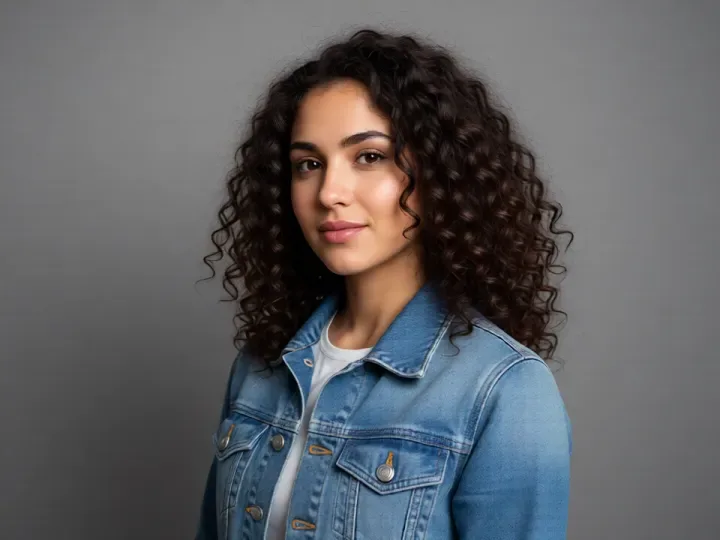
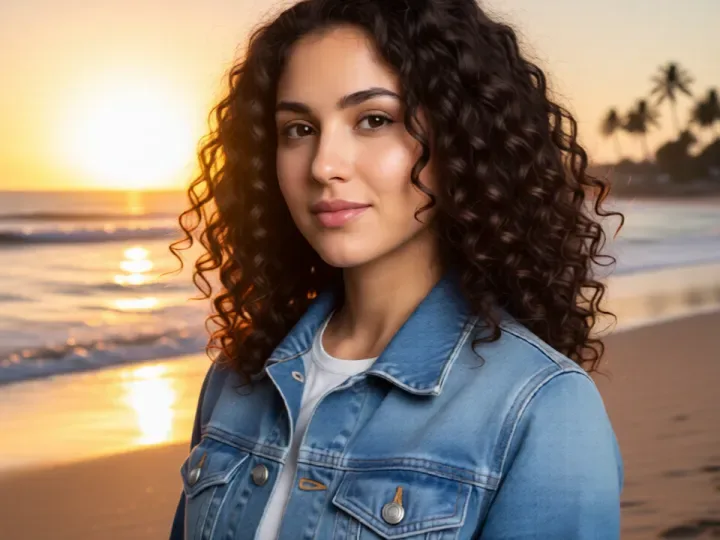
Both images come from FastImg. The starting portrait was generated from text, then edited with the prompt above.
How to change photo backgrounds with AI
- Upload the photo whose background you want to change
- Describe the new background, for example a beach at golden hour or a plain white wall
- Generate the edit and compare it with the original using the slider
- Try another background from the same photo if you want a different look
- Download the version you like as a PNG
When to change a background
- Turn a plain studio portrait into an outdoor scene
- Put a profile photo in front of a tidy, neutral wall
- Move a product from a desk to a clean backdrop
- Match a group of photos to the same setting
- Replace a distracting street scene with something calmer
Input and output
- Works best when the subject is clearly separated from the current background
- Input: one photo at a time as JPEG, PNG, WebP, or GIF; an optional second image can be attached as a style reference
- Very large photos are scaled down in your browser before the edit is sent
- Output: every version downloads as a PNG, straight from the timeline
- The edit follows your prompt, so name the exact thing to change and what should stay the same
Frequently asked questions
Is FastImg free forever?
Yes. FastImg image editing is free forever, with unlimited edits and no signup required.
Will my edited image have a watermark?
No. FastImg does not add a watermark to edited images.
Will the person or object stay the same when the background changes?
That is the goal of the edit. You describe only the new background, and FastImg keeps the subject in place. If something drifts, go back one step on the timeline and rephrase the prompt.
Can I try several backgrounds on the same photo?
Yes. Each edit is a branch from the original, so you can generate a beach, a studio wall, and a city street from the same photo and compare them side by side.
Do I need to cut out the subject first?
No. Upload the photo as it is and describe the background you want. There is no masking or manual selection step.