 FASTIMG
 English
edit tool
AI product photo editor
Free forever · Unlimited edits · No signup · No watermark
Shoot the product on your desk, then let FastImg do the studio work: clear the clutter, drop in a clean backdrop, adjust the lighting, or add a prop. Each prompt builds on the last, so one photo can become a whole listing.
Before and after: sneakers moved from a messy desk to a white backdrop
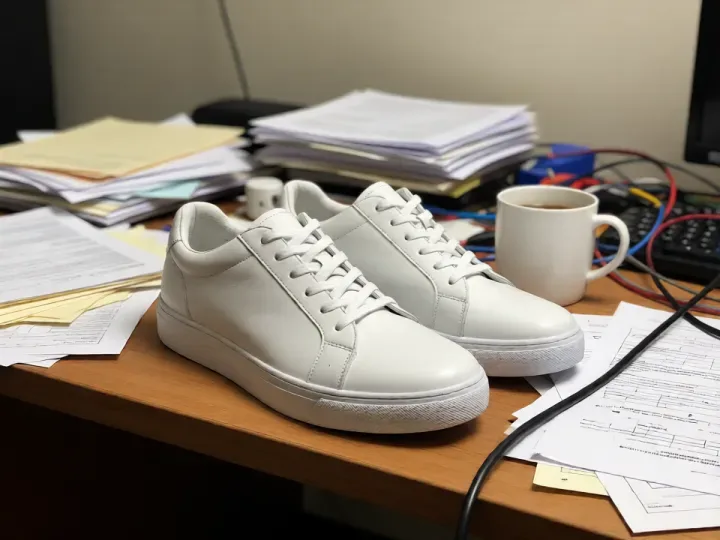
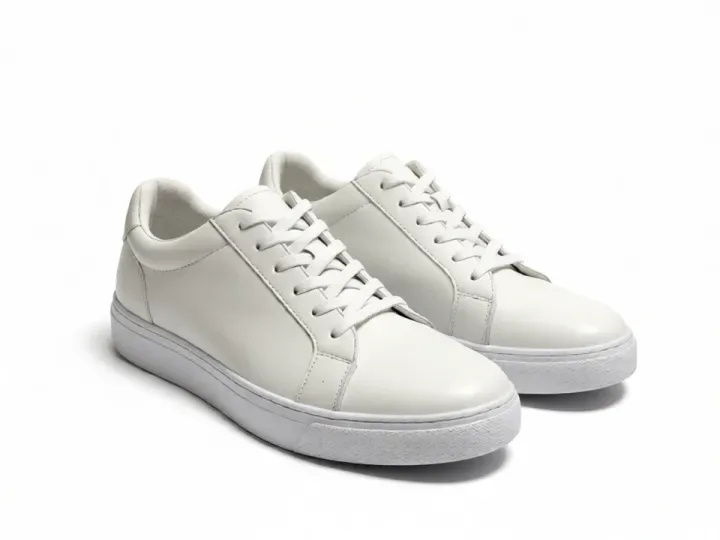
Both images come from FastImg. The desk photo was generated from text, then edited with the prompt above.
How to edit product photos with AI
- Upload a product photo taken with any camera or phone
- Describe the first change, for example a clean white backdrop
- Add follow-up prompts for lighting, shadows, or props, each building on the last
- Go back to an earlier version if a step goes too far
- Download any version as a PNG
Product photo edits you can do
- Replace a desk or floor with a clean white or colored backdrop
- Remove packaging, cables, and clutter around the product
- Add a prop or a surface such as marble or wood
- Change the lighting mood from flat to warm or dramatic
- Create several variations of one shot for a listing
Input and output
- One product per photo works best; group shots can be edited but need more specific prompts
- Keep product-specific details in the prompt, such as keep the label readable
- Input: one photo at a time as JPEG, PNG, WebP, or GIF; an optional second image can be attached as a style reference
- Very large photos are scaled down in your browser before the edit is sent
- Output: every version downloads as a PNG, straight from the timeline
- The edit follows your prompt, so name the exact thing to change and what should stay the same
Frequently asked questions
Is FastImg free forever?
Yes. FastImg image editing is free forever, with unlimited edits and no signup required.
Will my edited image have a watermark?
No. FastImg does not add a watermark to edited images.
Will the product itself change?
The edit targets what you describe, such as the background or clutter, and keeps the product as it is. If a detail drifts, step back and add keep the product unchanged to the prompt.
Can I make several versions of one product photo?
Yes. Branch from the same original to create a white backdrop, a lifestyle scene, and a colored background, and download each as a PNG.
Do I need a lightbox or studio to start?
No. A phone photo on a desk is enough. Describe the backdrop and lighting you want and FastImg produces it.